


Download Y Supra – Free IRC Communication Tool for Windows
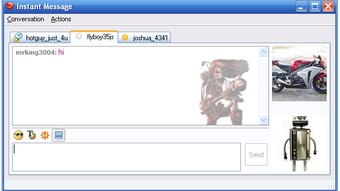
Y Supra is a free, lightweight communication tool designed specifically for Windows users who enjoy real-time chat via IRC (Internet Relay Chat). Developed by Dubee, this software has been a go-to choice for enthusiasts seeking a simple, no-frills IRC client since its release in 2011. With a clean interface and minimal system requirements, Y Supra delivers fast and reliable connectivity to IRC networks, making it ideal for both beginners and experienced users.
Despite being over a decade old, it continues to maintain a loyal user base, particularly in regions like Saudi Arabia, where it remains popular among online communities. Although it hasn’t received updates since 2011, its core functionality remains intact, offering a stable platform for text-based communication. The software is compatible with Windows XP and earlier versions, making it accessible on older systems.
While it lacks modern features such as video chat or mobile support, its focus on speed and simplicity ensures a smooth experience for those who prioritize direct, real-time messaging. If you're looking for a free, secure, and dependable IRC client for Windows, Y Supra is worth considering—especially if you're on an older machine or prefer a minimalistic approach to online chat.
Why Y Supra Stands Out in the World of IRC Clients
When it comes to IRC clients, most modern options come packed with features—video calling, file sharing, rich media integration, and sleek UIs. However, Y Supra takes a different path by focusing on what matters most: fast, stable, and straightforward communication. For users who value performance over flashy design, this software is a breath of fresh air.
Its lightweight architecture means it runs efficiently even on outdated hardware, which is a significant advantage for users still relying on Windows XP or older systems. The software’s minimalistic interface ensures that users aren’t overwhelmed by unnecessary options, allowing them to connect to IRC channels and start chatting within seconds. What makes Y Supra truly stand out is its reliability.
Since its release in 2011, it has maintained a consistent performance record, with minimal crashes and no reported malware issues. This stability is especially important for users who depend on real-time communication for gaming communities, tech forums, or collaborative projects. Moreover, the fact that it’s completely free and open to download without registration makes it accessible to a global audience.
While it may lack modern enhancements like encryption or mobile sync, its core functionality remains robust and secure. For users who appreciate simplicity and efficiency, Y Supra offers a nostalgic yet functional experience that’s hard to replicate with newer, more complex tools. It’s not just a piece of software—it’s a testament to how a well-designed, focused application can remain relevant for over a decade.
Key Features of Y Supra: What You Get for Free
- Lightweight & Fast Performance: Designed to run smoothly on older systems, Y Supra uses minimal RAM and CPU, making it ideal for Windows XP and earlier.
- Simple, Intuitive Interface: Clean layout with easy-to-navigate menus and quick access to channels, servers, and settings.
- IRC Network Connectivity: Connect to popular IRC networks like EFNet, Undernet, and DalNet with built-in server lists.
- Multiple Channel Support: Join and manage several channels simultaneously without lag or crashes.
- Customizable Nicknames & Identifiers: Set up unique nicknames, real names, and user IDs to personalize your presence.
- Message Logging: Automatically saves chat history for later review, useful for tracking discussions or referencing past conversations.
- Free to Download & Use: No registration, no ads, no hidden fees—just a straightforward, open-access IRC client.
How to Install and Use Y Supra on Your Windows PC
Installing Y Supra is a straightforward process, especially for users familiar with older Windows systems. Since it’s a portable application, there’s no need for a traditional installer—just download the ZIP or EXE file from a trusted source and extract it to your desired folder. Once extracted, simply double-click the Y Supra executable file to launch the application.
The first-time setup is minimal: you’ll be prompted to enter your nickname, real name, and optionally, a password for your IRC account. After that, you can browse the built-in server list or manually input a server address to connect to your preferred IRC network. The interface is intuitive, with clearly labeled tabs for channels, users, and messages.
You can join channels by typing /join #channelname in the input box, and messages appear in real time with timestamped logs. For users who want to save chat history, the logging feature can be enabled in the settings menu. One of the biggest advantages of Y Supra is its low system footprint—no background processes, no startup delays, and no need for administrator rights.
It’s perfect for users who want a quick, secure way to communicate without cluttering their system. Even if you’re not tech-savvy, the straightforward setup ensures you can be online and chatting within minutes. Because it doesn’t require installation, you can even run it from a USB drive on any Windows PC, making it a convenient tool for shared or temporary systems.
Compatibility and System Requirements
Y Supra is specifically designed for Windows operating systems, with full compatibility for Windows XP and earlier versions. This makes it a unique choice in today’s software landscape, where most applications require Windows 7 or later. Its ability to run on legacy systems is one of its strongest selling points, especially for users with older hardware or restricted IT environments.
While newer versions of Windows (like Windows 10 and 11) may not natively support it due to compatibility issues, users can often run Y Supra in compatibility mode or through virtual machines. The software does not require .NET Framework or other runtime dependencies, which further enhances its portability and ease of use. However, it’s important to note that Y Supra has not been updated since 2011, meaning it lacks support for modern security protocols and may not function optimally on current networks.
For users seeking a secure, up-to-date experience, this could be a limitation. Nevertheless, for those who value functionality on older systems or are part of niche IRC communities that still use legacy setups, Y Supra remains a viable option. It’s worth mentioning that the software is only available in English, which may affect non-English speakers.
Despite its age, the software continues to be downloaded—16,370 times since 2012—with a recent spike in interest from users in Saudi Arabia, indicating its enduring relevance in specific communities.
Pros and Cons of Using Y Supra
Pros:
- Completely free to download and use with no ads or hidden costs.
- Extremely lightweight—ideal for older or low-spec Windows machines.
- Simple, clutter-free interface that’s easy to navigate for beginners.
- Stable performance with minimal crashes or bugs.
- Portable—can be run from a USB drive without installation.
- Supports multiple IRC networks and channels simultaneously.
Cons:
- No updates since 2011—lacks modern security features and compatibility with newer systems.
- Not compatible with Windows 7 and later versions without workarounds.
- Only available in English, limiting accessibility for non-English speakers.
- Lacks advanced features like encryption, file transfer, or rich media support.
- No mobile app or cross-platform availability (Android, iOS, Mac).
Frequently Asked Questions (FAQ)
Final Verdict: Is Y Supra Still Worth It in 2024?
While Y Supra may seem outdated by today’s standards, it remains a solid choice for a specific audience: users on legacy Windows systems or those who value simplicity over modern features. Its lightweight design, stable performance, and zero cost make it a reliable tool for accessing IRC networks without the bloat of newer applications. However, due to its lack of updates and security features, it’s not recommended for users on modern systems or those concerned about data privacy.
If you’re part of a niche online community that still uses IRC and are working with older hardware, Y Supra could be your perfect fit. For everyone else, consider exploring more up-to-date alternatives. Still, if you're looking for a free, secure, and dependable way to chat via IRC on Windows XP or earlier, downloading Y Supra is a smart move.
Don’t miss out on this classic tool—get it today and experience the power of real-time communication the way it was meant to be.
Download Y Supra now and join the conversation—fast, free, and hassle-free.







